
Short answer
AI agents for ITSM are software agents that read a service request, incident or alert, gather the context they need, decide on the next step and carry it out in your service management tools, within limits you set. They work best on high-volume, well-documented work such as access requests, password and account issues, ticket triage, known-error fixes and routine changes. The value comes from letting agents act, not just answer, so the deciding factor is control: which actions an agent may take on its own, which need a human approval, and how every action is recorded. Start with three or four request types, give the agent suggest-only rights, and raise its autonomy one level at a time as the evidence builds.
What is an AI agent in ITSM?
An AI agent in IT service management is a program that pursues a service outcome, such as "restore this user's VPN access", by planning steps, calling tools and checking the result. A chatbot answers questions. A rule-based workflow follows a fixed path and stops when the situation does not match the rule. An agent can read an unstructured ticket, look up the configuration item and the knowledge article, choose an action, run it through an approved tool, confirm that the service works again, and hand over to a person with a summary when it cannot.
| Approach | What it does | Where it stops |
|---|---|---|
| Virtual assistant or chatbot | Answers questions and links knowledge articles | Cannot change anything in your systems |
| Rule-based workflow | Runs a fixed sequence when a ticket matches a condition | Breaks on requests that do not match the rule |
| AI agent | Interprets the request, gathers context, acts through approved tools and verifies the outcome | Stops at the approval limit you set, then hands over with context |
Why are IT teams looking at AI agents now?
Agents are arriving inside the tools IT already runs. Gartner predicts that 40% of enterprise applications will include task-specific AI agents by 2026, up from less than 5% in 2025. For service work more broadly, Gartner also predicts that agentic AI will resolve 80% of common customer service issues without human intervention by 2029. That forecast covers customer service, but the same pattern of repeatable requests and documented fixes is what most IT service desks handle every day.
The caution is just as clear. Gartner predicts that over 40% of agentic AI projects will be cancelled by the end of 2027, citing rising costs, unclear business value and inadequate risk controls. In ITSM, those risks are concrete: an agent that closes tickets it did not fix, grants access it should not, or runs a change outside a change window. The teams that succeed treat agents as part of the operating model, with defined permissions and evidence, not as a chatbot upgrade.
Which ITIL practices suit AI agents first?
ITIL 4 describes 34 management practices. Agents fit best where the work is frequent, the steps are documented and the result can be checked. The table suggests where to start and how much freedom to give an agent at the outset.
| ITIL practice | What the agent does | Starting autonomy | What proves the task is done |
|---|---|---|---|
| Service desk | Understands the request in plain language, asks for missing details, routes or resolves | Act within limits for information and status requests | Employee confirms the answer or the status is correct |
| Service request management | Fulfils catalogue items such as software access, licence assignment or group membership | Act with approval, then within limits for low-risk items | Entitlement visible in the target system and approval recorded |
| Incident management | Triages, matches known errors, runs approved fixes, escalates with a summary | Suggest, then act within limits for known errors | Service check passes and the incident is not reopened |
| Problem management | Clusters repeat incidents and drafts a problem record with likely causes | Suggest only | Problem manager accepts or rejects the analysis |
| Knowledge management | Drafts articles from resolved tickets and flags outdated ones | Draft for human review | Article approved by its owner and used in later resolutions |
| Change enablement | Prepares the change record, assesses risk, checks windows and conflicts | Draft and act with approval; standard changes within limits | Change approved, carried out in its window and verified afterwards |
| Monitoring and event management | Correlates alerts, suppresses duplicates and opens one incident with context | Act within limits for correlation; suggest for suppression rules | One incident per real event and no missed critical alert |
| IT asset management | Reconciles assets with the configuration database and handles asset requests | Act with approval | Asset record matches discovery data |
| Service level management | Watches breach risk and prompts the owner before a breach | Act within limits for alerts and reminders | Breaches fall and alerts arrive before the deadline |
How much should an AI agent be allowed to do on its own?
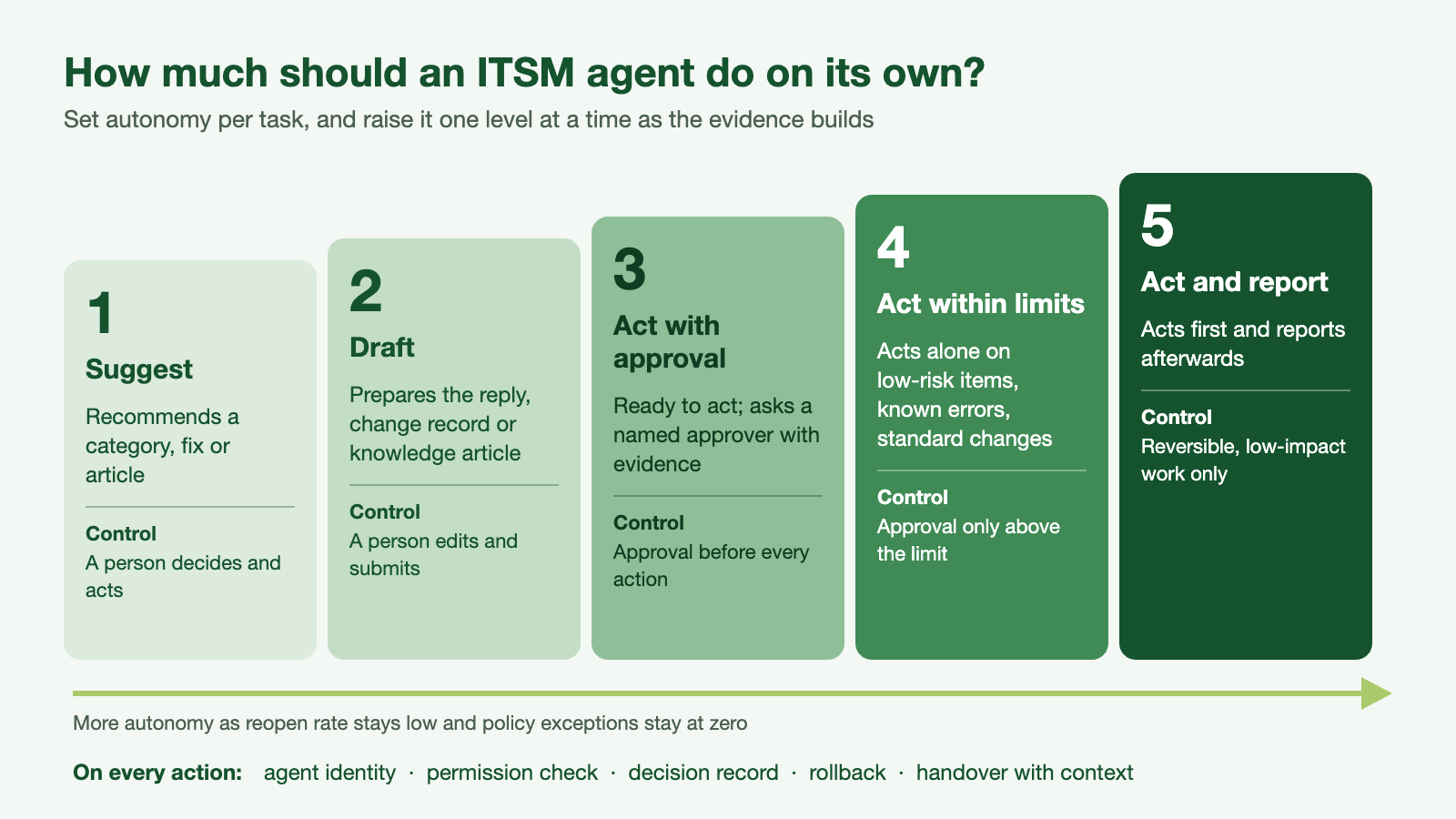
Treat autonomy as a setting per task, not per agent. The same agent can be trusted to reset a password on its own and still need a person to approve a firewall change. Five levels cover most ITSM work:
- Suggest. The agent recommends a category, a fix or an article. A person decides and acts.
- Draft. The agent prepares the change record, the reply or the knowledge article. A person edits and submits.
- Act with approval. The agent is ready to act and asks a named approver first, with the evidence attached.
- Act within limits. The agent acts on its own inside set limits, such as low-risk catalogue items, known errors or standard changes, and asks for approval beyond them.
- Act and report. The agent acts and reports afterwards. Reserve this for reversible, low-impact work with a strong track record.
Raise a task by one level only when the evidence supports it: a low reopen rate, no policy exceptions and approvers who have stopped changing the agent's proposals.
What controls does an ITSM agent need?
An agent that can change systems needs the same discipline you apply to people with admin rights, applied every time it acts:
- Its own identity. Each agent runs under its own account, never a shared service account, so every action can be traced to it.
- Least-privilege tools. The agent can call only the tools and APIs its tasks need, scoped to the systems and data involved.
- Approval limits by risk. Limits follow your existing risk rules: change risk class, data sensitivity, cost, number of users affected.
- A decision record. For every action, log the request, the context the agent used, the policy it checked, the approval if one was needed, the action taken and the result.
- Rollback and stop. Every action type has a defined undo, and an operator can pause an agent or a whole task type at once.
- Handover with context. When the agent stops, the person who picks up the ticket sees what was tried and why it stopped.
This is the layer ElixirClaw provides as an Agentic OS: an agent gateway that checks identity and permissions on every call, decision boundaries and human-in-the-loop approvals, connectors and an MCP gateway into tools such as ServiceNow and Jira, and observability over each agent's actions. Context such as configuration data, knowledge and ticket history comes from ElixirData, so agents decide with current information rather than stale copies.
How do AI agents work with ServiceNow and Jira Service Management?
The ITSM platform stays the system of record. Agents read and update tickets, change records and knowledge through the platform's APIs, and the platform keeps its own audit trail, SLAs and approvals. ServiceNow, Atlassian, BMC and other vendors now ship their own agents, and these are a good fit for work that stays inside one platform. Many service requests do not: a new joiner request touches the identity provider, the HR system, licence portals and device management. That cross-system work needs one runtime that applies the same approval limits and keeps one record, whichever system the action lands in. Our comparison of an Agentic OS and vendor agent control planes explains when each fits.
How should you measure an ITSM agent?
Vendors define "deflection" and "auto-resolution" in different ways, so agree the definitions before the pilot and measure the same way for agents and people.
| Measure | Definition to agree | Why it matters |
|---|---|---|
| Resolved without handover | Tickets closed by the agent, confirmed by the user, not reopened within 7 days | Separates real resolution from closed tickets |
| Reopen rate | Share of agent-closed tickets reopened within 7 days | Shows whether fixes hold |
| Time to resolve | Median time from logging to confirmed resolution, by request type | Compares like with like |
| Handover quality | Share of handed-over tickets the engineer did not need to re-diagnose | A good handover saves time even when the agent cannot finish |
| Policy exceptions | Actions blocked by a limit, plus any action taken outside one | The first number should be visible; the second should be zero |
| Employee satisfaction | Survey score on agent-handled tickets against the human baseline | Speed that frustrates people is not a gain |
What are the risks, and how do you reduce them?
- Wrong action on a real system. Start at suggest or draft, require approval for anything irreversible and test every action type against a rollback.
- Out-of-date knowledge. An agent repeats whatever the knowledge base says. Assign article owners and let the agent flag articles that led to reopened tickets.
- Permissions that grow quietly. Review agent permissions on the same cycle as privileged user access.
- Loops and noise. Cap retries, and stop an agent that opens or updates more tickets than a set threshold in an hour.
- Personal data. Keep tickets, logs and prompts inside your data boundary and mask personal data the task does not need.
How do you start? A 90-day plan
- Weeks 1 to 2: baseline. Pick three or four request or incident types with high volume and documented fixes. Record today's volume, time to resolve and reopen rate.
- Weeks 3 to 6: suggest and draft. Run the agent alongside the service desk. Engineers accept, edit or reject each proposal, and every decision is logged.
- Weeks 7 to 10: act with approval. For the types where proposals were accepted unchanged most of the time, let the agent act after a one-click approval.
- Weeks 11 to 13: act within limits. Move one or two low-risk types to autonomous action, review the decision records weekly and decide what to expand next.
Related reading on AI agents for IT service management
- AI agents for ticketing and incident resolution
- Monitoring SLA compliance with AI agents
- Eliminating stale tickets with AI agents
- AI agents for asset request fulfilment
- Reducing false positives in ITSM and security operations
- Help desk manager AI agents and incident response automation agents
Frequently asked questions
Will AI agents replace the IT service desk?
No. They take on repeatable requests and the first steps of diagnosis, so engineers spend more time on complex incidents, problems and improvements. People still own approvals, exceptions and anything new.
Which ITSM tasks should we automate first?
High-volume requests with documented fixes and an easy check that they worked: account unlocks, access requests for standard software, status queries, known-error incidents and standard changes.
Do we need to replace our ITSM platform?
No. The platform stays the system of record. Agents work through its APIs and add a control layer for actions that cross systems.
How is an AI agent different from AIOps?
AIOps finds patterns in monitoring data and raises better alerts. An AI agent goes further: it decides on an action, carries it out through approved tools and checks the result, within limits you set.
How do we keep agents compliant with change and audit rules?
Map approval limits to your change risk classes, give each agent its own identity and keep a decision record for every action. Auditors can then trace any change to a request, a policy check and an approval.
Next step
Read the Agentic OS buyer's guide to plan your evaluation, see how ElixirClaw supports enterprise AI operations, or book an architecture review and we will map three of your service desk request types to autonomy levels, approval limits and a decision record.


